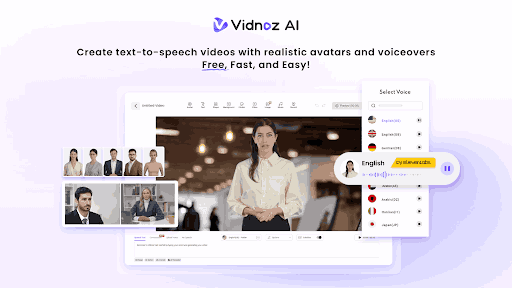
Creating YouTube content used to mean investing in cameras, microphones, video editors, and hours of production time. As someone always looking for smarter ways to streamline that process, I decided to put Vidnoz AI to the test. What I found genuinely impressed me, especially for a free tool.
Vidnoz AI is a free AI-powered video creation platform that lets you generate professional videos in minutes, without filming or editing experience. It isn’t just polished; it’s certified to ISO/IEC 27001:2022 for Information Security Management, which gives me real confidence that my data and projects are safe and secure.
Here’s what it offers and how I used it.
Key Features That Stand Out
Check out the features that make Vidnoz stand out from the rest:
1,900+ Lifelike Avatars
The first thing that caught my attention was the variety of avatars. Vidnoz AI offers over 1,900 lifelike avatars across industries and roles, including business professionals and educators, tech presenters, and lifestyle creators. Whatever niche your YouTube channel falls into, there’s almost certainly an avatar that fits the context.
What I found especially useful is the flexibility to go beyond the pre-made options. You can use your own digital twin (a custom avatar modeled after you). This expressive avatar communicates with natural emotion and movement, or a product avatar designed to represent a brand or item visually. This level of customization means your videos never feel generic.
2,000+ Lip-Sync AI Voices
A video is only as good as its voiceover, and Vidnoz AI doesn’t cut corners here. The platform provides over 2,000 natural-sounding AI voices across 140+ languages, powered by industry leaders, ElevenLabs, Microsoft, and Google. The lip-sync accuracy was noticeably smooth when I tested it, with the avatar’s mouth movements matching the audio in a way that felt genuinely natural rather than robotic. For a multilingual YouTube audience, this feature alone is a massive advantage.
You can also read about the Hidden Risks of Skipping Proper Business Verification.
2,800+ Pre-Designed Video Templates
Starting from scratch is one of the biggest creative hurdles in content production. Vidnoz AI eliminates that with over 2,800 pre-designed video templates spanning a wide range of styles, topics, and formats. Whether I needed a clean corporate explainer, a punchy social media teaser, or an educational walkthrough, there was a template ready to go. It saved me significant time and gave my videos a polished, professional baseline from the very first click.
Free Daily Use
Here’s something that genuinely surprised me: every user gets 30 free credits per day, no credit card required. For someone just getting started or testing before committing, this is a meaningful no-risk entry point. I was able to produce short YouTube intro clips and segment previews entirely within the free tier.
How to Use Vidnoz AI: A Step-by-Step Walkthrough
Getting started was far simpler than I expected. Here’s exactly how I created my first video:
Step 1: Choose a Template & Avatar. I started by browsing the template library and filtering by video style. Once I selected a template that matched my content theme, I picked an avatar from the extensive library. I went with a professional-looking presenter who fit my channel’s tone.
Step 2: Create AI Voiceover. Next, I typed in my script directly into the platform. I then selected a voice from the AI voice library, choosing one powered by ElevenLabs for a particularly natural cadence. The lip-sync preview loaded quickly, and the result was convincingly smooth.
Step 3: Add Custom Touch. This is where I further personalized the video. I adjusted the background, added my intro text, tweaked the color scheme to match my branding, and dropped in a few additional slides using the template editor. The interface was intuitive enough that I didn’t need any prior video editing experience.
Step 4: Generate AI Video and Share. Once everything looked good, I hit generate. Within a couple of minutes, my video was ready. I downloaded it in HD and uploaded it directly to YouTube. The whole process, from opening the platform to having a finished video, took me under 20 minutes.
Final Thoughts
After testing Vidnoz AI across several YouTube videos, I can say it genuinely delivers on its promise. The combination of a massive avatar library, high-quality multilingual voiceovers, ready-to-use templates, and a meaningful free tier makes it one of the more complete AI video tools I’ve tried. Whether you’re a solo creator, educator, or small business building a YouTube presence, Vidnoz AI removes most of the technical and financial barriers that often slow content production.
If you’ve been looking for a smarter, faster way to create YouTube content, it’s worth trying out Vidnoz AI today for free.